
I have to admit that I haven’t been up this late in ages. I’m not going to say that work is tiring or anything because it’s not stressful enough to be tiring. It’s just the that fact I enjoy going to bed earlier nowadays. Tonight, I’m waiting for a certain program to finish and I don’t feel like sleeping, setting my alarm for five in the morning and having to drag myself back on the computer. My notebook is downstairs, uncharged, and yet I am too lazy to even consider charging it.
I just finished my nighttime ritual of taking out my contact lenses and washing my face. I can literally feel my thick moisturizer being soaked up by my skin. I got Peter’s older Nokia Lumia 900 to use until the Note 3 comes out. At this rate, I think I’ll get it although the Galaxy S4 is never far from my mind. I checked out the two new Nokia Windows phones and I’m adding them to the list as well. I got to play with the Toshiba’s KIRAbook yesterday. The Microsoft Store has it for $1999 and I must say it seems almost worth the price. At the end of the day, you have to pay premium to get premium, you know? I’ve played with a lot of notebooks, tablets, ultrabooks, etc., and not much has really caught my attention other than the KIRAbook and the ASUS Vivobook. Originally, I’ve been looking for an extremely light and portable notebook. I have thought about the tablets but I figure I just get a touchscreen notebook that is perhaps 11″ more or less, I’d be set with the stability that a notebook provides with the portability of a tablet. I work with a 27″ monitor (and sometimes a 32″) on a regular basis so I wonder how well I’ll transition if I get something that small.
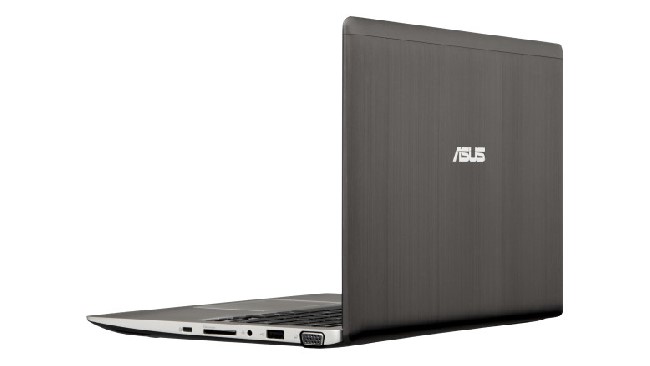
ASUS Vivobook
The ASUS Vivobook X202E provides the quality I’ve come to expect from ASUS which is just about always decent. I would much prefer Samsung but the one they currently have at the store is just not cutting it for me. It essentially was an updated version of my current Samsung Chronos 7. 8 GB of RAM, check. A dedicated AMD graphics card and a third generation i7 processor, check and check. Just about the same except instead of 1 TB of hard drive space which my current has, the new one come with a solid state (not sure what the amount of storage it came with, I’m guess 128 GB). Anyway, so the Vivobook comes with a 1.80 Ghz i3 processor, 4 GB RAM, and 500 GB hard drive at 5400 rpm which is a bit slow compared to what’s in other machines these days. It’s going for $399 and at 2.86 lbs., I can’t really beat that. It has a 11.6 LED LCD touch display which makes life a whole lot easier for me. So when it comes down to it, I’m really considering getting it and I’ve been thinking about it for about a month now.

Toshiba KIRAbook
The Toshiba KIRAbook on the other hand, I actually just got to play with it on Wednesday. Man, it is so fast and snappy. It actually makes me want to stay on the computer and not do anything else all day. Everything about this ultrabook screams “PREMIUM” to me. From it’s extremely sleek finish and design, to the Harmon Kardon speakers, to the 256 GB SSD, and its i7 processor that overclocks from 2.00 to a 3.10 Ghz. It has 8 GB RAM (DDR3). It does not have a dedicated video card and I admit that the battery life is on the low to average end compared to the 11 hours I get with my Samsung while the KIRAbook gets a measly 6 hours. Toshiba isn’t new to the industry but they been floating by and have been off the radar for the past couple of years. I have to say that my opinion is changing slightly due to my recent experience but we will have to see. Further testing is required. :) At 2.97 lbs., it outweighs the Vivobook by .11 lbs. I’m not trying to exclusively compare them because they are in completely different classes of their own and it would be stupid for me to compare a $400 computer with a $2000. However, I do mention them together just because there are the only two I have been debating on purchasing. I’m sure I’ll check out a few more notebooks on the way.
At the end of the day, I’m probably more comfortable losing a $400 notebook over an overpriced $2K ultrabook. Oh yes, I forgot to mention earlier that I would be using this for work. I could technically bring my Samsung, but I wouldn’t feel great about losing that either. I liken my Samsung notebook to a workhouse as it carries most of the workload although I am making the effort not to neglect my desktop. My Samsung is kind of like my spouse … so I may look at other notebooks and ultrabooks, but at the end of the day, I know that my 700Z is perfect for me and has the capabilities that I need and want. Not saying I wouldn’t but=y the KIRAbook on a whim though ;P. I think a lot of new products will be introduced very soon so it would be wiser for me to wait lest the Vivobook drops even more on its current price. At that point, I would use my student discount and “BAM” I’d be in heaven.
Random Thoughts and the Xbox One
How in the world did I end up talking about technology and electronics again? Anyway, I am quite tired but I’m glad nevertheless that I got to sit down and get some of my thoughts out. I’m looking forward to my day off and of doing absolutely nothing. So much has been on my mind and I have to say that the Xbox Reveal on Tuesday has gotten me really hyped up and I usually don’t get hyped up for anything. I’ll probably be one of the first ones to buy it though because unless it’s such a failure of a product, I can’t see why not. I think a lot of people are worried about the wrong things such as how it looks, and whether or not it will still be a good gaming console, etc. Some people did not get the impression that it was a “gaming console” and that’s because it’s not just a gaming console anymore. It’s an all-in-one, an entertainment center. Xbox Reveal was more of a trailer and a strategic move on Microsoft’s part.
First off, who cares if it looks boxier, inorganic, etc.? It seems a lot sturdier to me, uniform, and better ventilated to me. I’d rather my Xbox One not overheat or topple over because someone prioritized form over function. Secondly and continuing my thoughts about it being an entertainment center, this is going to be the product for the next ten years. Microsoft had to make such dramatic changes to the architecture that it would be a step backwards to play it safe and make an Xbox 360 sister product. If you really think about it, you won’t need a Roku or an Apple TV, six different remotes, or even a Smart TV anymore because you will have it all if the Xbox One works they way they’re intending it to. I think the Xbox One really simplifies it and they weren’t kidding about that at all. For all the people concerned about how it’s no longer a gaming console, hold your horses and wait for E3. It wouldn’t have made ANY sense to reveal most (or any) of the Xbox One’s gaming capabilities before E3.
My thoughts are that Microsoft already has the info and details on the PS4 and put out the Xbox Reveal only a month before E3 for two reasons possibly: one, to hype up consumers and therefore invoke a lot of discussion by the media, and two, to put Sony on their toes because Microsoft knows that the Xbox One is going to trump the PS4 (and the fact that it’s too late for Sony to change anything). From the responses and prompt actions of Sony following the Xbox Reveal last Tuesday, I’d sat Sony is pulling their hair out right now. So this is why I think it was more of a strategic move for Microsoft.
As E3 approaches us, only time will tell. Maybe Sony has a card up their sleeve, but regardless of whether it’s Sony or Microsoft, we’re all anticipating.
Enough about technology. I’m going to head off to bed and hopefully blog about make up tomorrow. Also, if there are any typos or grammatical errors, it’s way too late for that right now so just deal with it. :)







 Napalm Kitty